If your team is still filling out Autotask fields by hand on every ticket, you're leaving easy MSP help desk automation wins on the table. Two built-in Autotask PSA features - templates and speed codes - can take a routine, error-prone task and turn it into a one-click action, which is exactly the kind of small change that adds up to real ticket triage automation over time.
Both features work across Autotask PSA and LiveMobile, and both apply to the same set of entities: tickets and recurring tickets, tasks, ticket or task time entries and notes, project notes, service calls, quick calls, opportunities, and quotes. Used together, they're one of the simplest forms of PSA automation already sitting inside a tool most MSPs already own.
What Templates Do for MSP Workflow Automation
A template automatically populates multiple fields on an Autotask form in a single step—ticket type, priority, queue, assigned resource, due date, and more, depending on how it's configured. Templates can also be set to trigger notification emails to specified recipients the moment they're applied, so the right people get looped in without a tech having to remember to send a heads-up.
After a template loads, every field remains editable, so techs aren't locked into rigid defaults; they're just starting from a much faster baseline. That's the core value of helpdesk automation at this level: it doesn't remove human judgment, it removes repetitive data entry.
Templates can be scoped in three ways:
- Personal – available only to the tech who created them
- Department – shared across a specific team
- Company-wide – available to everyone, depending on security level permissions
This tiered access matters for MSP dispatch automation specifically. A dispatch or service manager can build company-wide templates for common ticket types (onboarding, password resets, hardware failures) so every tech—regardless of tenure—triages and routes tickets the same consistent way.
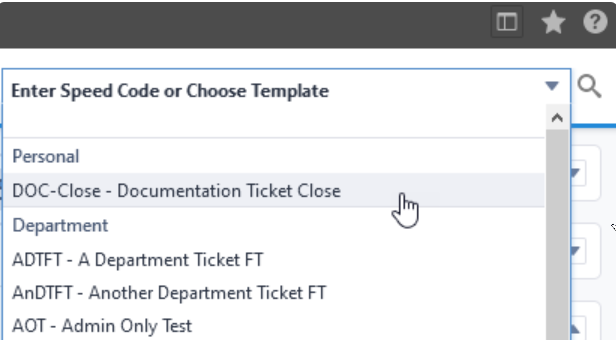
Speed Codes: The Fastest Path to MSP Help Desk Efficiency
Speed codes push template automation even further. Instead of searching a dropdown list for the right template, a tech types a short code—up to 10 letters, numbers, and symbols—and Autotask instantly applies the matching template. For high-volume help desks, this small shortcut is a meaningful contributor to MSP help desk efficiency, because it shaves seconds off every single ticket, and those seconds compound across hundreds of tickets a week.
Speed codes work across the same entity types as templates:
- Ticket and recurring ticket
- Task
- Ticket or task time entry and note
- Project note
- Service call
- Quick call
- Opportunity
- Quote
For MSPs evaluating Autotask automation software or looking to get more out of their existing PSA automation with AI, templates and speed codes are a good starting point precisely because they're native, free, and fast to set up—no third-party AI Autotask automation tool required to get the basic workflow benefits.
Where AI Autotask Automation Picks Up
Templates and speed codes standardize how data gets entered—but they still require a human to select the right template and apply it. This is where AI ticket automation for MSPs goes a step further: instead of a tech choosing a template, an AI service desk for MSP operations can read incoming ticket details and apply the correct routing, priority, and assignment automatically, before a tech ever touches it.
Combining Autotask's native templates and speed codes with an AI + Autotask integration layer gives help desks the best of both: consistent, pre-built data entry for the tickets techs still handle manually, and full automation for the repetitive, rules-based ones that don't need a human at all.
Want to see more of what's possible inside Autotask? Check out our posts on Checklists in Autotask and Daily Alerts in Autotask.
Want to automate your MSP? Schedule a demo or sign up for a free trial to see how Rocketship for Autotask can automate your calendars, escalations, and ticket assignments—so your team can focus on helping clients instead of micromanaging tickets.